Mermaid
- 추천0
- GitHub 별91K
- 문서라이선스MIT
Markdown 비슷한 텍스트로 순서도 · 시퀀스 · 간트 등 20여 종 다이어그램을 그리는 JavaScript 도구. MIT
요약
Markdown 비슷한 텍스트로 순서도 · 시퀀스 · 간트 등 20여 종 다이어그램을 그리는 JavaScript 도구. MIT
설명
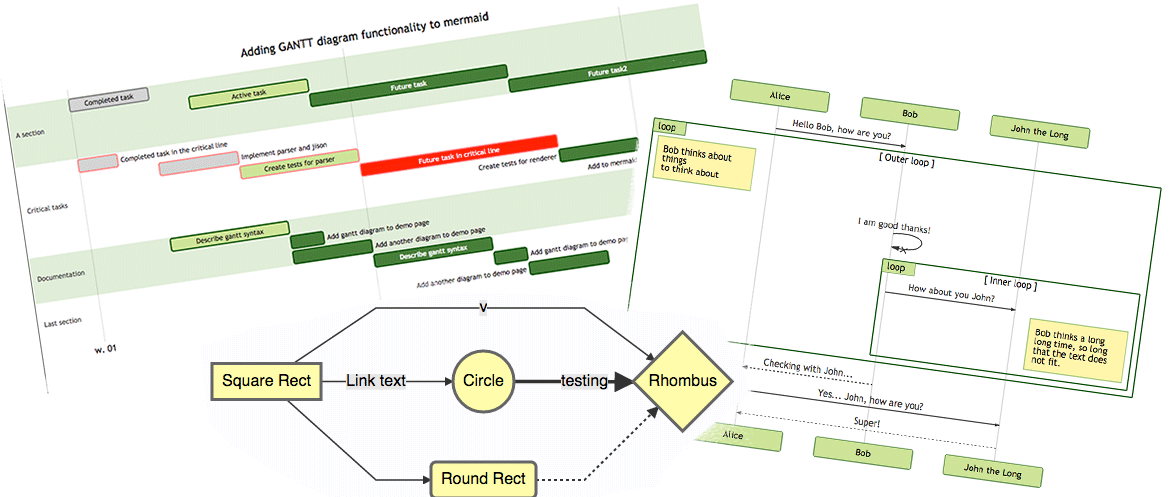
Markdown과 비슷한 텍스트로 다이어그램을 만듭니다.
라이브 에디터! 📖 문서 | 🚀 시작하기 | 🌐 CDN | 🙌 함께하기 | 간체 중국어









🏆 Mermaid는 JS 오픈 소스 어워드(2019)에서 "가장 흥미진진한 기술 활용" 부문 후보에 오르고 수상했습니다!!!
풀 리퀘스트를 올리신 분들, 질문에 답해 주신 분들, 참여해 주신 모든 분께 감사합니다! 🙏
차례
소개
Mermaid는 Markdown에서 영감을 받은 텍스트 정의와 렌더러로 복잡한 다이어그램을 만들고 고치는 JavaScript 기반 다이어그램 · 차트 도구입니다. Mermaid의 주된 목적은 문서가 개발을 따라잡도록 돕는 것입니다.
문서 부패(Doc-Rot)는 Mermaid가 해결하는 데 도움을 주는 딸레마입니다.
다이어그램을 그리고 문서를 쓰는 일은 소중한 개발 시간을 쓰고 금방 냡아륳니다. 그렇다고 다이어그램이나 문서가 없으면 생산성이 망가지고 조직의 학습에 해가 됩니다. Mermaid는 쉽게 고칠 수 있는 다이어그램을 만들 수 있게 해 이 문제를 해결합니다. 프로덕션 스크립트(그 밖 코드 조각)의 일부로 만들 수도 있습니다.
Mermaid는 비개발자도 Mermaid 라이브 에디터로 자세한 다이어그램을 쉽게 만들 수 있게 합니다. 동영상 튜토리얼은 튜토리얼 페이지를 보세요. 좋아하는 애플리케이션에서 Mermaid를 쓰려면 Mermaid 통합 및 사용 목록을 확인하세요.
GitHub에서도 Mermaid를 쓸 수 있고 그 밖에 좋아하는 여러 애플리케이션에서도 쓸 수 있습니다. Mermaid 통합 및 사용 목록을 보세요.
Mermaid의 더 자세한 소개와 기본 사용법은 초보자 가이드, 사용법, 튜토리얼을 보세요.
저희의 PR 시각 회귀 테스트는 Argos가 너그러운 오픈 소스 요금제로 지원합니다. 시각적 변경이 있는 PR을 쉽게 검토할 수 있게 해 줍니다.

릴리스 과정에서는 applitools를 써서 시각 회귀 테스트에 크게 의존합니다. Applitools는 쓰기 쉽고 저희 테스트에 통합하기도 쉬운 훌륭한 서비스입니다.
기능
- 20종 이상의 다이어그램 – 순서도, 시퀀스, 클래스, 상태, ER, 간트, 파이, Git 그래프, 마인드맵, 타임라인, 색키 등
- Markdown에서 영감을 받은 문법 – 다이어그램을 텍스트로 작성하며, 드래그 앤 드롭이 필요 없습니다
- 디자인 도구 불필요 – 코드만으로 전문적인 다이어그램을 만듭니다
- 라이브 에디터 – mermaid.live에서 바로 프로토타입을 만듭니다
- 버전 관리에 적합 – 다이어그램이 텍스트로 있어 차이 비교와 리뷰가 그대로 됩니다
- GitHub에서 바로 렌더링 – Mermaid 코드 블록이 GitHub의 Markdown에서 직접 그려집니다
- 높은 사용자 정의성 – 테마, 색, 글꼴, 레이아웃 방향
- 보안 우선 – 내장 살균 처리와 샌드박스 렌더링 모드
- 가벼움 – 작은 용량, 무거운 의존성 없음
- 활발한 커뮤니티 – 잦은 릴리스와 수천 명의 기여자
- 오픈 소스 – MIT 라이선스
예시
다음은 Mermaid로 만들 수 있는 다이어그램 · 차트 · 그래프의 몇 가지 예입니다. 텍스트 문법으로 바로 가려면 여기를 누르세요.
순서도 [문서]
flowchart LR

A[Hard] -->|Text| B(Round)
B --> C{Decision}
C -->|One| D[Result 1]
C -->|Two| E[Result 2]
flowchart LR

A[Hard] -->|Text| B(Round)
B --> C{Decision}
C -->|One| D[Result 1]
C -->|Two| E[Result 2]
시퀀스 다이어그램 [문서]
sequenceDiagram
Alice->>John: Hello John, how are you?
loop HealthCheck
    John->>John: Fight against hypochondria
end
Note right of John: Rational thoughts!
John-->>Alice: Great!
John->>Bob: How about you?
Bob-->>John: Jolly good!
sequenceDiagram
Alice->>John: Hello John, how are you?
loop HealthCheck
    John->>John: Fight against hypochondria
end
Note right of John: Rational thoughts!
John-->>Alice: Great!
John->>Bob: How about you?
Bob-->>John: Jolly good!
간트 차트 [문서]
gantt
    section Section
    Completed :done,    des1, 2014-01-06,2014-01-08
    Active        :active,  des2, 2014-01-07, 3d
    Parallel 1   :         des3, after des1, 1d
    Parallel 2   :         des4, after des1, 1d
    Parallel 3   :         des5, after des3, 1d
    Parallel 4   :         des6, after des4, 1d
gantt
    section Section
    Completed :done,    des1, 2014-01-06,2014-01-08
    Active        :active,  des2, 2014-01-07, 3d
    Parallel 1   :         des3, after des1, 1d
    Parallel 2   :         des4, after des1, 1d
    Parallel 3   :         des5, after des3, 1d
    Parallel 4   :         des6, after des4, 1d
클래스 다이어그램 [문서]
classDiagram
Class01 <|-- AveryLongClass : Cool
<<Interface>> Class01
Class09 --> C2 : Where am I?
Class09 --* C3
Class09 --|> Class07
Class07 : equals()
Class07 : Object[] elementData
Class01 : size()
Class01 : int chimp
Class01 : int gorilla
class Class10 {
  <<service>>
  int id
  size()
}
classDiagram
Class01 <|-- AveryLongClass : Cool
<<Interface>> Class01
Class09 --> C2 : Where am I?
Class09 --* C3
Class09 --|> Class07
Class07 : equals()
Class07 : Object[] elementData
Class01 : size()
Class01 : int chimp
Class01 : int gorilla
class Class10 {
  <<service>>
  int id
  size()
}
상태 다이어그램 [문서]
stateDiagram-v2
[*] --> Still
Still --> [*]
Still --> Moving
Moving --> Still
Moving --> Crash
Crash --> [*]
stateDiagram-v2
[*] --> Still
Still --> [*]
Still --> Moving
Moving --> Still
Moving --> Crash
Crash --> [*]
파이 차트 [문서]
pie
"Dogs" : 386
"Cats" : 85.9
"Rats" : 15
pie
"Dogs" : 386
"Cats" : 85.9
"Rats" : 15
Git 그래프 [실험적]
gitGraph
  commit
  commit
  branch develop
  checkout develop
  commit
  commit
  checkout main
  merge develop
  commit
  commit
gitGraph
  commit
  commit
  branch develop
  checkout develop
  commit
  commit
  checkout main
  merge develop
  commit
  commit
막대 차트(간트 차트 활용) [문서]
gantt
    title Git Issues - days since last update
    dateFormat  X
    axisFormat %s

    section Issue19062
    71   : 0, 71
    section Issue19401
    36   : 0, 36
    section Issue193
    34   : 0, 34
    section Issue7441
    9    : 0, 9
    section Issue1300
    5    : 0, 5
gantt
    title Git Issues - days since last update
    dateFormat  X
    axisFormat %s

    section Issue19062
    71   : 0, 71
    section Issue19401
    36   : 0, 36
    section Issue193
    34   : 0, 34
    section Issue7441
    9    : 0, 9
    section Issue1300
    5    : 0, 5
사용자 여정 다이어그램 [문서]
  journey
    title My working day
    section Go to work
      Make tea: 5: Me
      Go upstairs: 3: Me
      Do work: 1: Me, Cat
    section Go home
      Go downstairs: 5: Me
      Sit down: 3: Me
  journey
    title My working day
    section Go to work
      Make tea: 5: Me
      Go upstairs: 3: Me
      Do work: 1: Me, Cat
    section Go home
      Go downstairs: 5: Me
      Sit down: 3: Me
C4 다이어그램 [문서]
C4Context
title System Context diagram for Internet Banking System

Person(customerA, "Banking Customer A", "A customer of the bank, with personal bank accounts.")
Person(customerB, "Banking Customer B")
Person_Ext(customerC, "Banking Customer C")
System(SystemAA, "Internet Banking System", "Allows customers to view information about their bank accounts, and make payments.")

Person(customerD, "Banking Customer D", "A customer of the bank, <br/> with personal bank accounts.")

Enterprise_Boundary(b1, "BankBoundary") {

  SystemDb_Ext(SystemE, "Mainframe Banking System", "Stores all of the core banking information about customers, accounts, transactions, etc.")

  System_Boundary(b2, "BankBoundary2") {
    System(SystemA, "Banking System A")
    System(SystemB, "Banking System B", "A system of the bank, with personal bank accounts.")
  }

  System_Ext(SystemC, "E-mail system", "The internal Microsoft Exchange e-mail system.")
  SystemDb(SystemD, "Banking System D Database", "A system of the bank, with personal bank accounts.")

  Boundary(b3, "BankBoundary3", "boundary") {
    SystemQueue(SystemF, "Banking System F Queue", "A system of the bank, with personal bank accounts.")
    SystemQueue_Ext(SystemG, "Banking System G Queue", "A system of the bank, with personal bank accounts.")
  }
}

BiRel(customerA, SystemAA, "Uses")
BiRel(SystemAA, SystemE, "Uses")
Rel(SystemAA, SystemC, "Sends e-mails", "SMTP")
Rel(SystemC, customerA, "Sends e-mails to")
C4Context
title System Context diagram for Internet Banking System

Person(customerA, "Banking Customer A", "A customer of the bank, with personal bank accounts.")
Person(customerB, "Banking Customer B")
Person_Ext(customerC, "Banking Customer C")
System(SystemAA, "Internet Banking System", "Allows customers to view information about their bank accounts, and make payments.")

Person(customerD, "Banking Customer D", "A customer of the bank, <br/> with personal bank accounts.")

Enterprise_Boundary(b1, "BankBoundary") {

  SystemDb_Ext(SystemE, "Mainframe Banking System", "Stores all of the core banking information about customers, accounts, transactions, etc.")

  System_Boundary(b2, "BankBoundary2") {
    System(SystemA, "Banking System A")
    System(SystemB, "Banking System B", "A system of the bank, with personal bank accounts.")
  }

  System_Ext(SystemC, "E-mail system", "The internal Microsoft Exchange e-mail system.")
  SystemDb(SystemD, "Banking System D Database", "A system of the bank, with personal bank accounts.")

  Boundary(b3, "BankBoundary3", "boundary") {
    SystemQueue(SystemF, "Banking System F Queue", "A system of the bank, with personal bank accounts.")
    SystemQueue_Ext(SystemG, "Banking System G Queue", "A system of the bank, with personal bank accounts.")
  }
}

BiRel(customerA, SystemAA, "Uses")
BiRel(SystemAA, SystemE, "Uses")
Rel(SystemAA, SystemC, "Sends e-mails", "SMTP")
Rel(SystemC, customerA, "Sends e-mails to")
릴리스
권한이 있는 분을 위한 안내입니다.
package.json의 버전 번호를 고칩니다.
npm publish위 명령은 dist 폴더에 파일을 만들고 게시합니다.
관련 프로젝트
기여자 


Mermaid는 성장하는 커뮤니티이며 언제나 새 기여자를 환영합니다. 도울 수 있는 방법은 여러 가지이고, 저희는 항상 일손을 찾고 있습니다. 어디서부터 도와야 할지 알고 싶다면 이 이슈를 보세요.
기여하는 방법의 자세한 정보는 기여 가이드에 있습니다.
보안과 안전한 다이어그램
공개 사이트에서 인터넷 사용자의 텍스트를 받아 나중에 브라우저에 보여주기 위해 저장하는 것은 위험할 수 있습니다. 사용자 내용에 데이터가 표시될 때 실행되는 악의적인 스크립트가 들어 있을 수 있기 때문입니다. Mermaid에서는 이것이 위험입니다. 특히 Mermaid 다이어그램에는 HTML에서 쓰이는 문자가 많아 표준 살균 처리를 쓸 수 없기 때문이고, 그렇게 하면 다이어그램도 깨집니다. 그래도 들어오는 코드를 살균 처리하려고 노력하고 있고 과정을 계속 다듬고 있지만, 허점이 없다고 보장하기는 어렵습니다.
외부 사용자가 있는 사이트를 위한 추가 보안 단계로, 다이어그램을 샌드박스 iframe에서 렌더링해 코드 안의 자바스크립트가 실행되지 않도록 막는 새 보안 수준을 소개하게 되어 기쁩니다. 더 나은 보안을 향한 큰 걸음입니다.
아쉽게도 두 마리 토끼를 동시에 잡을 수는 없어서, 이 경우 악의적인 코드와 함께 일부 상호작용 기능도 막히는 것을 의미합니다.
취약점 신고
취약점을 신고하려면 문제에 대한 설명, 문제를 일으킨 단계, 영향받는 버전, 알려진 경우 완화 방법을 담아 security@mermaid.live로 메일을 보내 주세요.
감사의 말
Knut Sveidqvist의 감사 인사입니다.
그래픽 레이아웃과 드로잉 라이브러리를 제공한 d3와 dagre-d3 프로젝트에 큰 감사를 드립니다.
시퀀스 다이어그램의 문법을 쓸 수 있게 해 준 js-sequence-diagram 프로젝트에도 감사합니다. 간트 렌더링의 영감과 출발점을 준 Jessica Peter에게도 감사합니다.
2017년 4월부터 협력자로 함께해 온 Tyler Long에게 감사합니다.
이 프로젝트를 이만큼 끌어 온 점점 늘어나는 기여자 목록에 감사합니다!
Mermaid는 문서를 더 쉽게 만들기 위해 Knut Sveidqvist가 만들었습니다.
저장소: mermaid-js/mermaid
평점
- 5점
- 0
- 4점
- 0
- 3점
- 0
- 2점
- 0
- 1점
- 0