Wan2.2
- 추천0
- GitHub 별19K
- 영상라이선스Apache-2.0
알리바바 Wan의 오픈소스 영상 생성 모델. 텍스트·이미지·음성으로 영상을 만들고, 5B 모델은 RTX 4090 한 장으로 720P 영상을 만들어요(Apache-2.0)
요약
알리바바 Wan의 오픈소스 영상 생성 모델. 텍스트·이미지·음성으로 영상을 만들고, 5B 모델은 RTX 4090 한 장으로 720P 영상을 만들어요(Apache-2.0)
설명

Wan · GitHub · Hugging Face · ModelScope · 논문 · 블로그 · Discord · 사용 가이드(영어)
Wan2.2는 기반 영상 모델의 큰 업그레이드입니다. 이번 버전에서는 다음 혁신을 담았어요.
- 👍 효과적인 MoE 구조: 영상 확산 모델에 전문가 혼합(MoE) 구조를 처음 넣었습니다. 노이즈 제거 과정을 타임스텝별로 나눠 전문 모델이 맡게 해서, 계산 비용은 같게 두면서 전체 모델 용량을 키웠어요.
- 👍 영화급 미학: 조명, 구도, 대비, 색조 등을 자세히 라벨링한 엄선된 미학 데이터를 넣었습니다. 영화 같은 스타일을 더 정확하게 조절하고, 원하는 미학 취향에 맞는 영상을 만들 수 있어요.
- 👍 복잡한 움직임 생성: Wan2.1보다 훨씬 많은 데이터(이미지 +65.6%, 영상 +83.2%)로 학습해 움직임, 의미, 미학 같은 여러 면에서 일반화 성능이 눈에 띄게 좋아졌습니다. 공개·비공개 모델을 통틀어 최상위 성능을 냈다고 해요.
- 👍 효율적인 고화질 하이브리드 TI2V: 압축률 16×16×4의 Wan2.2-VAE를 쓴 5B 모델을 공개했습니다. 텍스트→영상과 이미지→영상을 모두 지원하고, 720P 24fps 영상을 RTX 4090 같은 일반 그래픽 카드에서 돌릴 수 있어요. 지금 나온 720P@24fps 모델 중 가장 빠른 축이라 산업과 학계 모두에 쓸 수 있습니다.
새 소식
- 2025-11-13: 👋 Wan2.2-Animate-14B를 Diffusers에 통합했어요(PR, 가중치). 기여해 주신 분들께 감사드립니다.
- 2025-09-19: 💃 캐릭터 애니메이션·교체용 통합 모델 **Wan2.2-Animate-14B**를 공개했어요. 몸 전체의 움직임과 표정을 그대로 옮기는 모델입니다. 모델 가중치와 추론 코드를 공개했고, wan.video, ModelScope Studio, HuggingFace Space에서 써 볼 수 있어요.
- 2025-09-05: 👋 음성→영상 작업에 CosyVoice로 음성 합성을 붙였어요.
- 2025-08-26: 🎵 음성으로 구동하는 영화급 영상 생성 모델 **Wan2.2-S2V-14B**를 공개했어요. 추론 코드, 모델 가중치, 기술 보고서가 함께 나왔고, wan.video, ModelScope Gradio, HuggingFace Gradio에서 써 볼 수 있습니다.
- 2025-07-28: 👋 TI2V-5B 모델을 쓰는 HF 스페이스를 열었어요.
- 2025-07-28: 👋 Wan2.2를 ComfyUI에 통합했어요(영어 안내).
- 2025-07-28: 👋 Wan2.2의 T2V, I2V, TI2V를 Diffusers에 통합했어요(T2V-A14B | I2V-A14B | TI2V-5B).
- 2025-07-28: 👋 Wan2.2의 추론 코드와 모델 가중치를 공개했습니다.
커뮤니티 작업
Wan2.1이나 Wan2.2 위에 만든 연구·프로젝트가 있고 더 많은 사람에게 알리고 싶다면 알려 주세요.
- Prompt Relay: 영상 생성에서 시간 축을 제어하는, 끼워 쓰는 추론 시점 방법이에요. 영상 품질을 높이고 순간마다 무슨 일이 일어날지 정확히 조절할 수 있습니다. 자세한 내용은 웹페이지를 보세요.
- Helios: Wan2.1 기반의 영상 생성 모델로, H100 한 장에서 19.5 FPS(Ascend NPU 한 장에서는 약 10 FPS)로 분 단위의 고품질 영상을 만들어요. 기존의 긴 영상 드리프트 방지 전략이나 표준 영상 가속 기법을 쓰지 않습니다. 자세한 내용은 웹페이지에 있어요.
- LightX2V: Wan2.1과 Wan2.2를 통합한 가볍고 효율적인 영상 생성 프레임워크로, 빠른 추론을 위한 여러 엔지니어링 가속 기법을 지원해요. LightX2V-HuggingFace에는 Wan 기반 스텝 증류 모델, 양자화 모델, 가벼운 VAE 모델이 있습니다.
- HuMo: Wan 기반의 사람 중심 통합 프레임워크로, 텍스트·이미지·오디오 같은 여러 입력에서 정교하게 조절되는 고품질 인물 영상을 만들어요. 자세한 내용은 웹페이지를 보세요.
- FastVideo: 희소 어텐션을 쓴 Wan 증류 모델을 담고 있어 추론 시간이 크게 줄어요.
- Cache-dit: Wan2.2 MoE에 DBCache, TaylorSeer, Cache CFG로 캐시 가속을 지원해요. 예제를 보세요.
- Kijai의 ComfyUI WanVideoWrapper: ComfyUI용 Wan 모델의 또 다른 구현이에요. Wan만 다루기 때문에 최신 최적화와 연구 기능을 빠르게 반영해요. 구조가 더 경직된 ComfyUI에는 이런 기능을 빨리 넣기 어렵거든요.
- DiffSynth-Studio: 층 단위로 GPU 메모리를 아끼는 오프로드, FP8 양자화, 시퀀스 병렬, LoRA 학습, 전체 학습까지 Wan 2.2를 폭넓게 지원해요.
- TalkVerse: Wan2.2-TI2V-5B 위에 만든 모델로, 음성으로 구동하는 분 단위 인물 영상을 만들어요. **대규모 데이터셋**과 학습·추론 코드, 모델 가중치를 공개해, 특히 계산 자원이 적은 연구자도 재현할 수 있게 했어요.
할 일 목록
- Wan2.2 텍스트→영상: [x] A14B·14B 모델 다중 GPU 추론 코드 · [x] 체크포인트 · [x] ComfyUI 통합 · [x] Diffusers 통합
- Wan2.2 이미지→영상: [x] A14B 모델 다중 GPU 추론 코드 · [x] 체크포인트 · [x] ComfyUI 통합 · [x] Diffusers 통합
- Wan2.2 텍스트·이미지→영상: [x] 5B 모델 다중 GPU 추론 코드 · [x] 체크포인트 · [x] ComfyUI 통합 · [x] Diffusers 통합
- Wan2.2-S2V 음성→영상: [x] 추론 코드 · [x] Wan2.2-S2V-14B 체크포인트 · [x] ComfyUI 통합 · [x] Diffusers 통합
- Wan2.2-Animate 캐릭터 애니메이션·교체: [x] 추론 코드 · [x] 체크포인트 · [x] ComfyUI 통합 · [x] Diffusers 통합
Wan2.2 실행
설치
저장소를 받습니다.
git clone https://github.com/Wan-Video/Wan2.2.git
cd Wan2.2
의존성을 설치합니다.
# torch >= 2.4.0인지 확인하세요
# `flash_attn` 설치가 실패하면 나머지 패키지를 먼저 설치하고 `flash_attn`을 마지막에 설치해 보세요
pip install -r requirements.txt
# 음성→영상에서 CosyVoice로 음성을 합성하려면 requirements_s2v.txt도 설치하세요
pip install -r requirements_s2v.txt
모델 내려받기
| 모델 | 내려받기 | 설명 |
|---|---|---|
| T2V-A14B | 🤗 Huggingface 🤖 ModelScope | 텍스트→영상 MoE 모델, 480P·720P 지원 |
| I2V-A14B | 🤗 Huggingface 🤖 ModelScope | 이미지→영상 MoE 모델, 480P·720P 지원 |
| TI2V-5B | 🤗 Huggingface 🤖 ModelScope | 고압축 VAE, T2V+I2V, 720P 지원 |
| S2V-14B | 🤗 Huggingface 🤖 ModelScope | 음성→영상 모델, 480P·720P 지원 |
| Animate-14B | 🤗 Huggingface 🤖 ModelScope | 캐릭터 애니메이션·교체 |
💡 TI2V-5B 모델은 24 FPS 720P 영상 생성을 지원합니다.
huggingface-cli로 내려받기:
pip install "huggingface_hub[cli]"
huggingface-cli download Wan-AI/Wan2.2-T2V-A14B --local-dir ./Wan2.2-T2V-A14B
modelscope-cli로 내려받기:
pip install modelscope
modelscope download Wan-AI/Wan2.2-T2V-A14B --local_dir ./Wan2.2-T2V-A14B
텍스트에서 영상 생성 실행
이 저장소는 Wan2.2-T2V-A14B 텍스트→영상 모델을 지원하고, 480P와 720P 해상도 영상 생성을 함께 지원합니다.
(1) 프롬프트 확장 없이
구현을 쉽게 하려고, 프롬프트 확장 단계를 건너뛴 기본 추론 과정부터 시작합니다.
- 단일 GPU 추론
python generate.py --task t2v-A14B --size 1280*720 --ckpt_dir ./Wan2.2-T2V-A14B --offload_model True --convert_model_dtype --prompt "Two anthropomorphic cats in comfy boxing gear and bright gloves fight intensely on a spotlighted stage."💡 이 명령은 VRAM이 80GB 이상인 GPU에서 실행할 수 있습니다.
💡 OOM(메모리 부족)이 나면
--offload_model True,--convert_model_dtype,--t5_cpu옵션으로 GPU 메모리 사용량을 줄일 수 있어요.
- FSDP + DeepSpeed Ulysses를 쓰는 다중 GPU 추론
추론을 빠르게 하려고 PyTorch FSDP와 DeepSpeed Ulysses를 씁니다.
torchrun --nproc_per_node=8 generate.py --task t2v-A14B --size 1280*720 --ckpt_dir ./Wan2.2-T2V-A14B --dit_fsdp --t5_fsdp --ulysses_size 8 --prompt "Two anthropomorphic cats in comfy boxing gear and bright gloves fight intensely on a spotlighted stage."(2) 프롬프트 확장 사용
프롬프트를 확장하면 생성 영상의 디테일이 풍부해지고 품질이 더 좋아집니다. 그래서 프롬프트 확장을 켜길 권장해요. 확장 방법은 두 가지입니다.
- Dashscope API로 확장하기
- 미리
dashscope.api_key를 신청하세요(영어 | 중국어). - 환경 변수
DASH_API_KEY에 Dashscope API 키를 지정하세요. 알리바바 클라우드 국제 사이트 사용자는 환경 변수DASH_API_URL도 'https://dashscope-intl.aliyuncs.com/api/v1'로 설정해야 합니다. 자세한 내용은 dashscope 문서를 보세요. - 텍스트→영상에는
qwen-plus모델을, 이미지→영상에는qwen-vl-max를 씁니다. - 확장에 쓰는 모델은
--prompt_extend_model파라미터로 바꿀 수 있어요. 예:
- 미리
DASH_API_KEY=YOUR_DASHSCOPE_API_KEY torchrun --nproc_per_node=8 generate.py --task t2v-A14B --size 1280*720 --ckpt_dir ./Wan2.2-T2V-A14B --dit_fsdp --t5_fsdp --ulysses_size 8 --prompt "Two anthropomorphic cats in comfy boxing gear and bright gloves fight intensely on a spotlighted stage" --use_prompt_extend --prompt_extend_method 'dashscope' --prompt_extend_target_lang 'zh'- 로컬 모델로 확장하기
- 기본으로 HuggingFace의 Qwen 모델을 씁니다. 쓸 수 있는 GPU 메모리 크기에 따라 Qwen 모델이나 다른 모델을 고를 수 있어요.
- 텍스트→영상에는
Qwen/Qwen2.5-14B-Instruct,Qwen/Qwen2.5-7B-Instruct,Qwen/Qwen2.5-3B-Instruct같은 모델을 쓸 수 있습니다. - 이미지→영상에는
Qwen/Qwen2.5-VL-7B-Instruct,Qwen/Qwen2.5-VL-3B-Instruct같은 모델을 쓸 수 있어요. - 큰 모델일수록 확장 결과가 좋지만 GPU 메모리가 더 필요합니다.
- 확장에 쓰는 모델은
--prompt_extend_model로 바꿀 수 있고, 로컬 모델 경로나 Hugging Face 모델을 지정하면 됩니다. 예:
torchrun --nproc_per_node=8 generate.py --task t2v-A14B --size 1280*720 --ckpt_dir ./Wan2.2-T2V-A14B --dit_fsdp --t5_fsdp --ulysses_size 8 --prompt "Two anthropomorphic cats in comfy boxing gear and bright gloves fight intensely on a spotlighted stage" --use_prompt_extend --prompt_extend_method 'local_qwen' --prompt_extend_target_lang 'zh'이미지에서 영상 생성 실행
이 저장소는 Wan2.2-I2V-A14B 이미지→영상 모델을 지원하고, 480P와 720P 해상도 영상 생성을 함께 지원합니다.
- 단일 GPU 추론
python generate.py --task i2v-A14B --size 1280*720 --ckpt_dir ./Wan2.2-I2V-A14B --offload_model True --convert_model_dtype --image examples/i2v_input.JPG --prompt "Summer beach vacation style, a white cat wearing sunglasses sits on a surfboard. The fluffy-furred feline gazes directly at the camera with a relaxed expression. Blurred beach scenery forms the background featuring crystal-clear waters, distant green hills, and a blue sky dotted with white clouds. The cat assumes a naturally relaxed posture, as if savoring the sea breeze and warm sunlight. A close-up shot highlights the feline's intricate details and the refreshing atmosphere of the seaside."이 명령은 VRAM이 80GB 이상인 GPU에서 실행할 수 있습니다.
💡 이미지→영상 작업에서
size파라미터는 생성 영상의 면적을 뜻하고, 가로세로 비율은 입력 이미지를 따릅니다.
- FSDP + DeepSpeed Ulysses를 쓰는 다중 GPU 추론
torchrun --nproc_per_node=8 generate.py --task i2v-A14B --size 1280*720 --ckpt_dir ./Wan2.2-I2V-A14B --image examples/i2v_input.JPG --dit_fsdp --t5_fsdp --ulysses_size 8 --prompt "Summer beach vacation style, a white cat wearing sunglasses sits on a surfboard. The fluffy-furred feline gazes directly at the camera with a relaxed expression. Blurred beach scenery forms the background featuring crystal-clear waters, distant green hills, and a blue sky dotted with white clouds. The cat assumes a naturally relaxed posture, as if savoring the sea breeze and warm sunlight. A close-up shot highlights the feline's intricate details and the refreshing atmosphere of the seaside."- 프롬프트 없이 이미지에서 영상 생성
DASH_API_KEY=YOUR_DASHSCOPE_API_KEY torchrun --nproc_per_node=8 generate.py --task i2v-A14B --size 1280*720 --ckpt_dir ./Wan2.2-I2V-A14B --prompt '' --image examples/i2v_input.JPG --dit_fsdp --t5_fsdp --ulysses_size 8 --use_prompt_extend --prompt_extend_method 'dashscope'💡 이 모델은 입력 이미지만으로도 영상을 만들 수 있어요. 프롬프트 확장을 쓰면 이미지에서 프롬프트를 만들어 줍니다.
프롬프트 확장 과정은 여기를 보세요.
텍스트·이미지에서 영상 생성 실행
이 저장소는 Wan2.2-TI2V-5B 텍스트·이미지→영상 모델을 지원하고, 720P 해상도 영상 생성을 지원합니다.
- 단일 GPU 텍스트→영상 추론
python generate.py --task ti2v-5B --size 1280*704 --ckpt_dir ./Wan2.2-TI2V-5B --offload_model True --convert_model_dtype --t5_cpu --prompt "Two anthropomorphic cats in comfy boxing gear and bright gloves fight intensely on a spotlighted stage"💡 다른 작업과 달리 텍스트·이미지→영상의 720P 해상도는
1280*704또는704*1280입니다.
이 명령은 VRAM이 24GB 이상인 GPU(예: RTX 4090)에서 실행할 수 있어요.
💡 VRAM이 80GB 이상인 GPU라면
--offload_model True,--convert_model_dtype,--t5_cpu옵션을 빼서 더 빠르게 돌릴 수 있습니다.
- 단일 GPU 이미지→영상 추론
python generate.py --task ti2v-5B --size 1280*704 --ckpt_dir ./Wan2.2-TI2V-5B --offload_model True --convert_model_dtype --t5_cpu --image examples/i2v_input.JPG --prompt "Summer beach vacation style, a white cat wearing sunglasses sits on a surfboard. The fluffy-furred feline gazes directly at the camera with a relaxed expression. Blurred beach scenery forms the background featuring crystal-clear waters, distant green hills, and a blue sky dotted with white clouds. The cat assumes a naturally relaxed posture, as if savoring the sea breeze and warm sunlight. A close-up shot highlights the feline's intricate details and the refreshing atmosphere of the seaside."💡 image 파라미터를 설정하면 이미지→영상이고, 설정하지 않으면 기본으로 텍스트→영상입니다.
💡 이미지→영상과 마찬가지로
size파라미터는 생성 영상의 면적을 뜻하고, 가로세로 비율은 입력 이미지를 따릅니다.
- FSDP + DeepSpeed Ulysses를 쓰는 다중 GPU 추론
torchrun --nproc_per_node=8 generate.py --task ti2v-5B --size 1280*704 --ckpt_dir ./Wan2.2-TI2V-5B --dit_fsdp --t5_fsdp --ulysses_size 8 --image examples/i2v_input.JPG --prompt "Summer beach vacation style, a white cat wearing sunglasses sits on a surfboard. The fluffy-furred feline gazes directly at the camera with a relaxed expression. Blurred beach scenery forms the background featuring crystal-clear waters, distant green hills, and a blue sky dotted with white clouds. The cat assumes a naturally relaxed posture, as if savoring the sea breeze and warm sunlight. A close-up shot highlights the feline's intricate details and the refreshing atmosphere of the seaside."프롬프트 확장 과정은 여기를 보세요.
음성에서 영상 생성 실행
이 저장소는 Wan2.2-S2V-14B 음성→영상 모델을 지원하고, 480P와 720P 해상도 영상 생성을 함께 지원합니다.
- 단일 GPU 음성→영상 추론
python generate.py  --task s2v-14B --size 1024*704 --ckpt_dir ./Wan2.2-S2V-14B/ --offload_model True --convert_model_dtype --prompt "Summer beach vacation style, a white cat wearing sunglasses sits on a surfboard."  --image "examples/i2v_input.JPG" --audio "examples/talk.wav"
# --num_clip을 지정하지 않으면 입력 오디오 길이에 맞춰 생성 영상 길이가 자동으로 정해집니다

# --enable_tts로 CosyVoice가 만든 오디오를 쓸 수 있습니다
python generate.py  --task s2v-14B --size 1024*704 --ckpt_dir ./Wan2.2-S2V-14B/ --offload_model True --convert_model_dtype --prompt "Summer beach vacation style, a white cat wearing sunglasses sits on a surfboard."  --image "examples/i2v_input.JPG" --enable_tts --tts_prompt_audio "examples/zero_shot_prompt.wav" --tts_prompt_text "希望你以后能够做的比我还好呦。" --tts_text "收到好友从远方寄来的生日礼物,那份意外的惊喜与深深的祝福让我心中充满了甜蜜的快乐,笑容如花儿般绽放。"
💡 이 명령은 VRAM이 80GB 이상인 GPU에서 실행할 수 있습니다.
- FSDP + DeepSpeed Ulysses를 쓰는 다중 GPU 추론
torchrun --nproc_per_node=8 generate.py --task s2v-14B --size 1024*704 --ckpt_dir ./Wan2.2-S2V-14B/ --dit_fsdp --t5_fsdp --ulysses_size 8 --prompt "Summer beach vacation style, a white cat wearing sunglasses sits on a surfboard." --image "examples/i2v_input.JPG" --audio "examples/talk.wav"- 포즈 + 오디오로 구동하는 생성
torchrun --nproc_per_node=8 generate.py --task s2v-14B --size 1024*704 --ckpt_dir ./Wan2.2-S2V-14B/ --dit_fsdp --t5_fsdp --ulysses_size 8 --prompt "a person is singing" --image "examples/pose.png" --audio "examples/sing.MP3" --pose_video "./examples/pose.mp4" 💡 음성→영상 작업에서
size파라미터는 생성 영상의 면적을 뜻하고, 가로세로 비율은 입력 이미지를 따릅니다.
💡 이 모델은 음성 입력에 기준 이미지와 선택 사항인 텍스트 프롬프트를 더해 영상을 만들 수 있어요.
💡
--pose_video파라미터를 쓰면 포즈로 구동하는 생성이 가능합니다. 오디오 입력과 맞는 영상을 만들면서 지정한 포즈 시퀀스를 따라가요.
💡
--num_clip파라미터는 생성할 영상 클립 수를 정합니다. 생성 시간을 줄여 미리 보기를 빠르게 볼 때 좋아요.
더 많은 예시와 이 모델에 맞는 상황은 프로젝트 페이지를 보세요.
Wan-Animate 실행
Wan-Animate는 영상과 캐릭터 이미지를 입력으로 받아 "애니메이션" 또는 "교체" 모드의 영상을 만듭니다.
- 애니메이션 모드: 캐릭터 이미지가 입력 영상 속 사람의 움직임을 따라 하는 영상을 만들어요.
- 교체 모드: 입력 영상 속 인물을 캐릭터 이미지로 바꿔 넣어요.
더 많은 예시와 이 모델에 맞는 상황은 프로젝트 페이지를 보세요.
(1) 전처리
입력 영상은 추론에 넣기 전에 여러 자료로 전처리해야 합니다. 아래 처리 흐름을 따르세요. 전처리에 대한 자세한 내용은 UserGuider에 있어요.
- 애니메이션용
python ./wan/modules/animate/preprocess/preprocess_data.py \
    --ckpt_path ./Wan2.2-Animate-14B/process_checkpoint \
    --video_path ./examples/wan_animate/animate/video.mp4 \
    --refer_path ./examples/wan_animate/animate/image.jpeg \
    --save_path ./examples/wan_animate/animate/process_results \
    --resolution_area 1280 720 \
    --retarget_flag \
--use_flux- 교체용
python ./wan/modules/animate/preprocess/preprocess_data.py \
    --ckpt_path ./Wan2.2-Animate-14B/process_checkpoint \
    --video_path ./examples/wan_animate/replace/video.mp4 \
    --refer_path ./examples/wan_animate/replace/image.jpeg \
    --save_path ./examples/wan_animate/replace/process_results \
    --resolution_area 1280 720 \
    --iterations 3 \
    --k 7 \
    --w_len 1 \
    --h_len 1 \
    --replace_flag
(2) 애니메이션 모드 실행
- 단일 GPU 추론
python generate.py --task animate-14B --ckpt_dir ./Wan2.2-Animate-14B/ --src_root_path ./examples/wan_animate/animate/process_results/ --refert_num 1- FSDP + DeepSpeed Ulysses를 쓰는 다중 GPU 추론
python -m torch.distributed.run --nnodes 1 --nproc_per_node 8 generate.py --task animate-14B --ckpt_dir ./Wan2.2-Animate-14B/ --src_root_path ./examples/wan_animate/animate/process_results/ --refert_num 1 --dit_fsdp --t5_fsdp --ulysses_size 8- Diffusers 파이프라인
from diffusers import WanAnimatePipeline
from diffusers.utils import export_to_video, load_image, load_video

device = "cuda:0"
dtype = torch.bfloat16
model_id = "Wan-AI/Wan2.2-Animate-14B-Diffusers"
pipe = WanAnimatePipeline.from_pretrained(model_id torch_dtype=dtype)
pipe.to(device)

seed = 42
prompt = "People in the video are doing actions."

# 애니메이션
image = load_image("/path/to/animate/reference/image/src_ref.png")
pose_video = load_video("/path/to/animate/pose/video/src_pose.mp4")
face_video = load_video("/path/to/animate/face/video/src_face.mp4")

animate_video = pipe(
    image=image,
    pose_video=pose_video,
    face_video=face_video,
    prompt=prompt,
    mode="animate",
    segment_frame_length=77,  # 원래 코드의 clip_len
    prev_segment_conditioning_frames=1,  # 원래 코드의 refert_num
    guidance_scale=1.0,
    num_inference_steps=20,
    generator=torch.Generator(device=device).manual_seed(seed),
).frames[0]
export_to_video(animate_video, "diffusers_animate.mp4", fps=30)
(3) 교체 모드 실행
- 단일 GPU 추론
python generate.py --task animate-14B --ckpt_dir ./Wan2.2-Animate-14B/ --src_root_path ./examples/wan_animate/replace/process_results/ --refert_num 1 --replace_flag --use_relighting_lora - FSDP + DeepSpeed Ulysses를 쓰는 다중 GPU 추론
python -m torch.distributed.run --nnodes 1 --nproc_per_node 8 generate.py --task animate-14B --ckpt_dir ./Wan2.2-Animate-14B/ --src_root_path ./examples/wan_animate/replace/process_results/src_pose.mp4 --refert_num 1 --replace_flag --use_relighting_lora --dit_fsdp --t5_fsdp --ulysses_size 8- Diffusers 파이프라인
# 파이프라인은 위 애니메이션 코드처럼 만듭니다

# 교체
image = load_image("/path/to/replace/reference/image/src_ref.png")
pose_video = load_video("/path/to/replace/pose/video/src_pose.mp4")
face_video = load_video("/path/to/replace/face/video/src_face.mp4")
background_video = load_video("/path/to/replace/background/video/src_bg.mp4")
mask_video = load_video("/path/to/replace/mask/video/src_mask.mp4")

replace_video = pipe(
    image=image,
    pose_video=pose_video,
    face_video=face_video,
    background_video=background_video,
    mask_video=mask_video,
    prompt=prompt,
    mode="replace",
    segment_frame_length=77,  # 원래 코드의 clip_len
    prev_segment_conditioning_frames=1,  # 원래 코드의 refert_num
    guidance_scale=1.0,
    num_inference_steps=20,
    generator=torch.Generator(device=device).manual_seed(seed),
).frames[0]
export_to_video(replace_video, "diffusers_replace.mp4", fps=30)
💡 Wan-Animate를 쓴다면
Wan2.2로 학습한 LoRA 모델은 권하지 않아요. 학습 중 가중치가 바뀌어 예상치 못한 동작이 생길 수 있습니다.
여러 GPU에서의 연산 효율
서로 다른 GPU에서 Wan2.2 모델별 연산 효율을 아래 그림과 같이 시험했어요. 결과는 총 시간(초) / 최대 GPU 메모리(GB) 형식입니다.
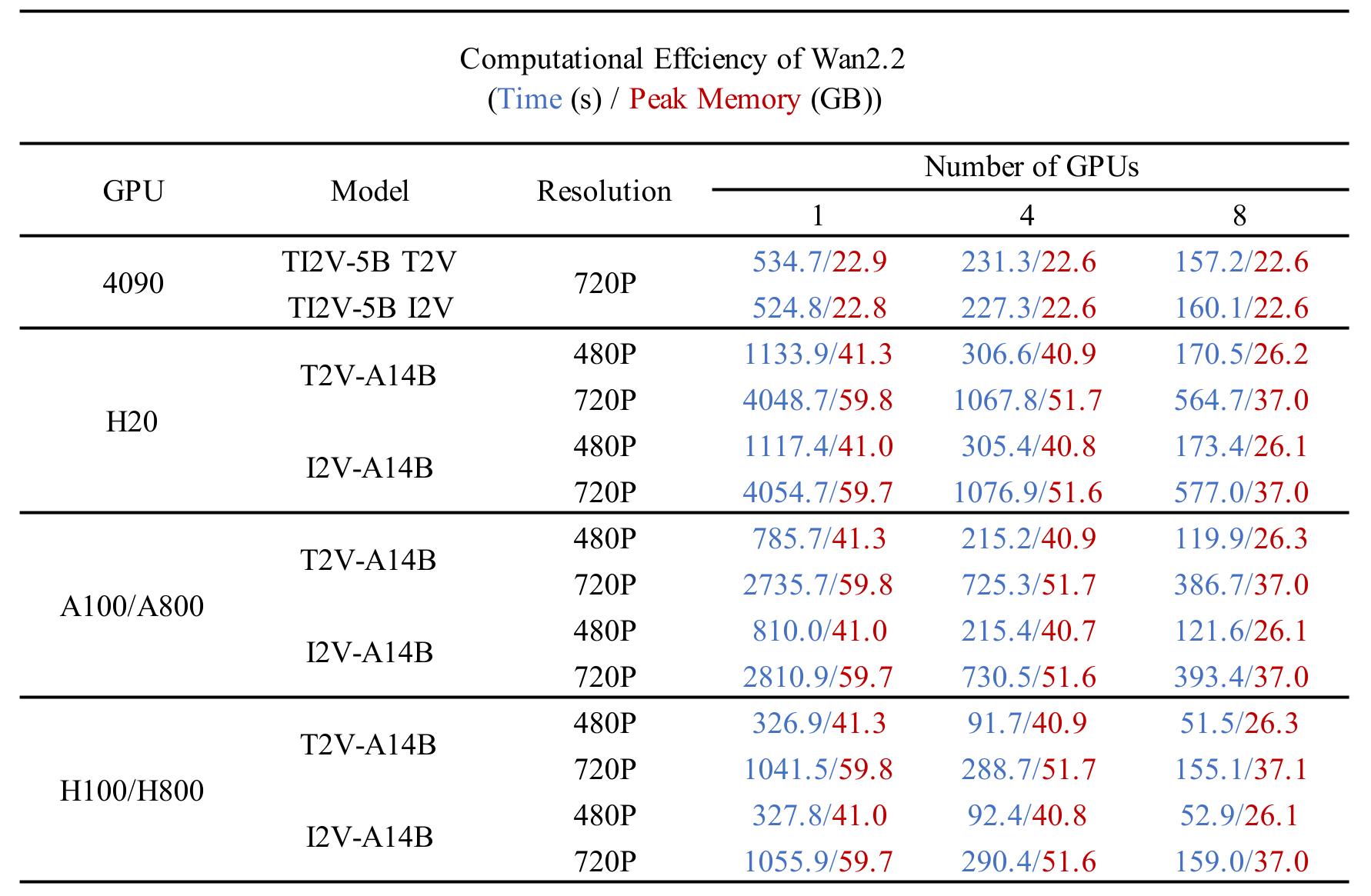
표의 시험 파라미터 설정은 다음과 같습니다. (1) 다중 GPU: 14B:
--ulysses_size 4/8 --dit_fsdp --t5_fsdp, 5B:--ulysses_size 4/8 --offload_model True --convert_model_dtype --t5_cpu; 단일 GPU: 14B:--offload_model True --convert_model_dtype, 5B:--offload_model True --convert_model_dtype --t5_cpu(--convert_model_dtype은 모델 파라미터 타입을 config.param_dtype으로 바꿉니다.) (2) 분산 시험은 내장 FSDP와 Ulysses 구현을 쓰고, Hopper 아키텍처 GPU에는 FlashAttention3를 썼습니다. (3) 시험은--use_prompt_extend플래그 없이 돌렸어요. (4) 보고된 결과는 워밍업 뒤에 여러 번 잰 값의 평균입니다.
Wan2.2 소개
Wan2.2는 Wan2.1을 바탕으로 생성 품질과 모델 능력을 눈에 띄게 개선했어요. 이 업그레이드는 전문가 혼합(MoE) 구조, 업그레이드한 학습 데이터, 고압축 영상 생성이라는 핵심 기술 혁신이 이끌었습니다.
(1) 전문가 혼합(MoE) 구조
Wan2.2는 영상 생성 확산 모델에 전문가 혼합(MoE) 구조를 넣었습니다. MoE는 추론 비용을 거의 그대로 두면서 전체 파라미터 수를 늘리는 효율적인 방법으로 대규모 언어 모델에서 이미 널리 검증됐어요. Wan2.2의 A14B 모델 시리즈는 확산 모델의 노이즈 제거 과정에 맞춘 두 전문가 설계를 씁니다. 초기 단계에서 전체 배치를 맡는 고노이즈 전문가와, 후반 단계에서 영상 디테일을 다듬는 저노이즈 전문가예요. 각 전문가 모델은 약 14B 파라미터라 총 27B 파라미터지만 단계마다 활성 파라미터는 14B뿐이어서, 추론 연산과 GPU 메모리는 거의 그대로입니다.

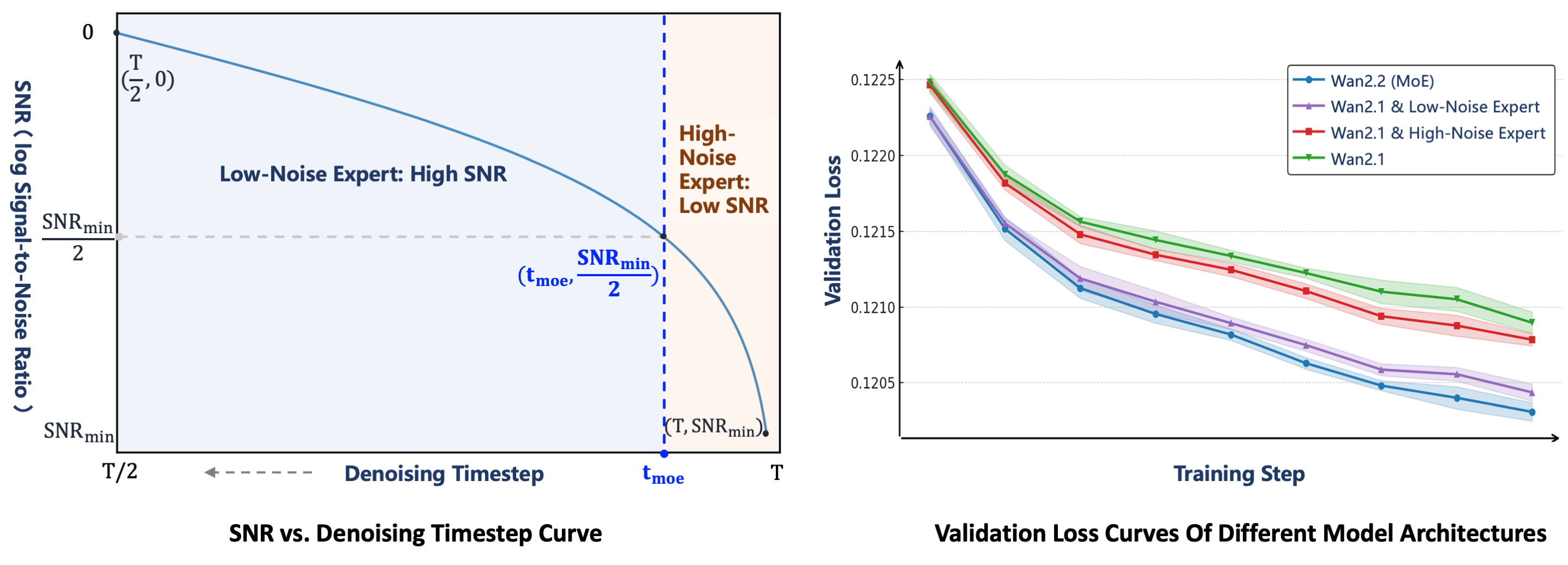
두 전문가가 바뀌는 지점은 신호 대 잡음비(SNR)로 정합니다. SNR은 노이즈 제거 단계 $t$가 커질수록 단조 감소하는 값이에요. 노이즈 제거가 시작될 때는 $t$가 크고 노이즈가 많아서 SNR이 최소(${SNR}{min}$)입니다. 이 단계에서는 고노이즈 전문가가 일해요. ${SNR}{min}$의 절반에 해당하는 임계 단계 ${t}{moe}$를 정하고, $t<{t}{moe}$가 되면 저노이즈 전문가로 바꿉니다.
MoE 구조의 효과를 확인하려고 검증 손실 곡선으로 네 가지 설정을 견줬습니다. 기준선인 Wan2.1 모델은 MoE를 쓰지 않아요. MoE 변형 중 Wan2.1 & 고노이즈 전문가는 Wan2.1을 저노이즈 전문가로 쓰고 Wan2.2의 고노이즈 전문가를 씁니다. Wan2.1 & 저노이즈 전문가는 Wan2.1을 고노이즈 전문가로 쓰고 Wan2.2의 저노이즈 전문가를 써요. 최종 버전인 **Wan2.2(MoE)**의 검증 손실이 가장 낮아서, 생성한 영상 분포가 실제 값에 가장 가깝고 수렴도 가장 좋았습니다.
(2) 효율적인 고화질 하이브리드 TI2V
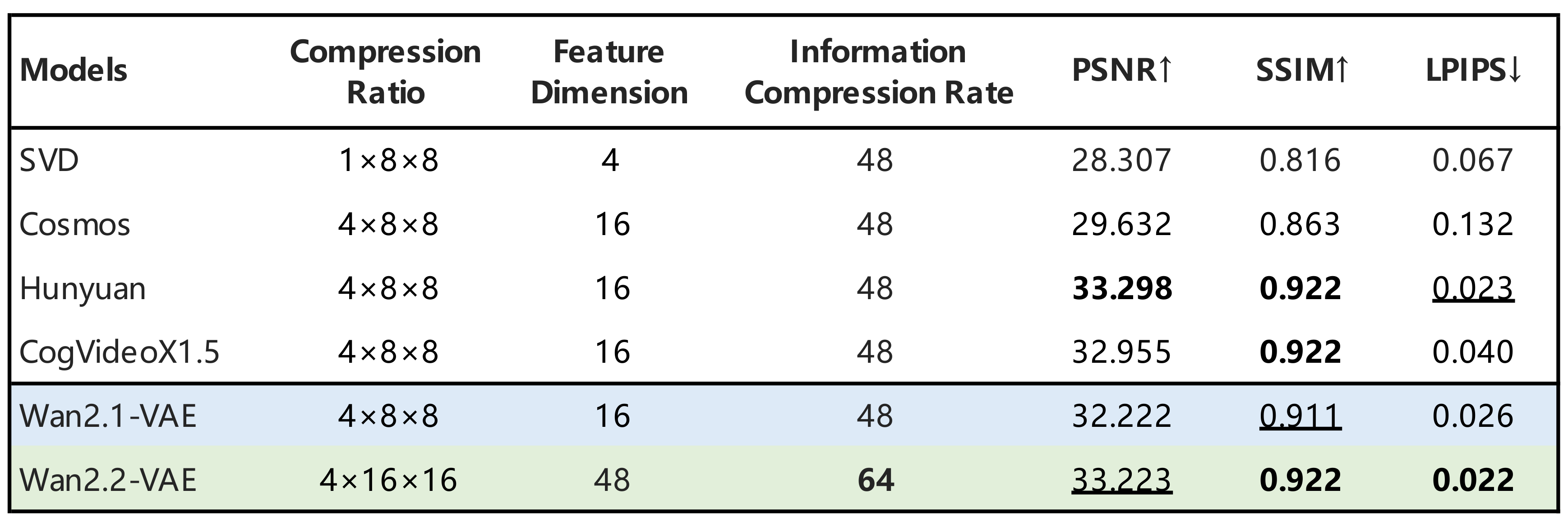
더 효율적으로 배포하려고 Wan2.2는 고압축 설계도 살폈습니다. 27B MoE 모델과 함께 5B 밀집 모델인 TI2V-5B를 공개했어요. 고압축 Wan2.2-VAE가 받쳐 주는데, 시간×높이×너비 압축률이 $4\times16\times16$이라 고품질 영상 복원을 유지하면서 전체 압축률이 64로 올라갑니다. 패치화 층을 하나 더하면 TI2V-5B의 전체 압축률은 $4\times32\times32$입니다. 별도 최적화 없이도 TI2V-5B는 일반 소비자용 GPU 한 장에서 5초 720P 영상을 9분 안에 만들 수 있어, 720P@24fps 영상 생성 모델 중 가장 빠른 축에 듭니다. 이 모델은 하나의 통합 틀에서 텍스트→영상과 이미지→영상 작업을 모두 지원해 학술 연구와 실제 응용을 함께 다룹니다.
최신 모델과의 비교
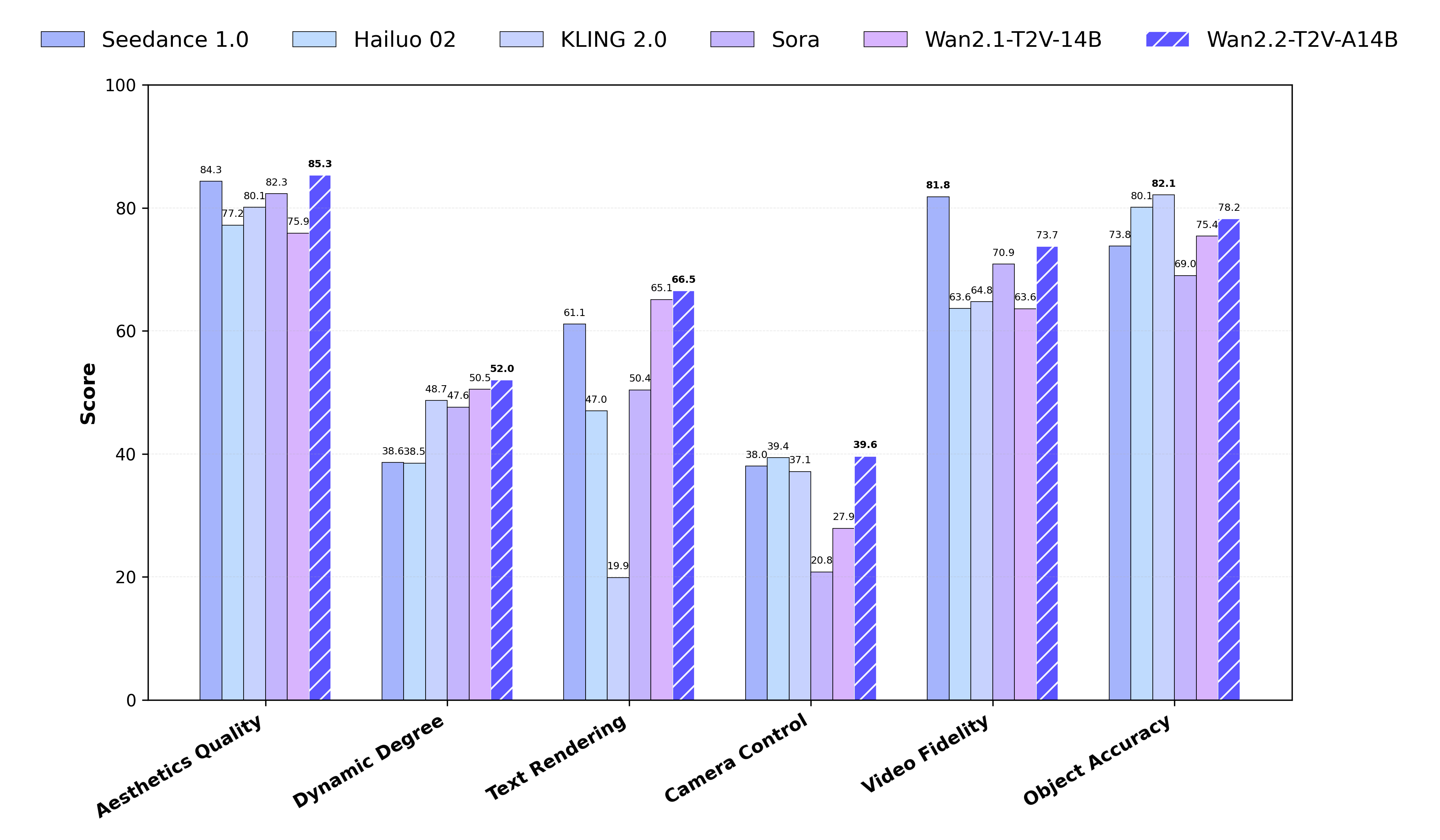
새로 만든 Wan-Bench 2.0에서 여러 핵심 항목에 걸쳐 Wan2.2를 선도적인 비공개 상용 모델과 견줬습니다. 결과는 Wan2.2가 이 모델들보다 더 좋은 성능을 낸다고 나왔어요.
인용
저희 작업이 도움이 됐다면 인용해 주세요.
@article{wan2025,
      title={Wan: Open and Advanced Large-Scale Video Generative Models},
      author={Team Wan and Ang Wang and Baole Ai and Bin Wen and Chaojie Mao and Chen-Wei Xie and Di Chen and Feiwu Yu and Haiming Zhao and Jianxiao Yang and Jianyuan Zeng and Jiayu Wang and Jingfeng Zhang and Jingren Zhou and Jinkai Wang and Jixuan Chen and Kai Zhu and Kang Zhao and Keyu Yan and Lianghua Huang and Mengyang Feng and Ningyi Zhang and Pandeng Li and Pingyu Wu and Ruihang Chu and Ruili Feng and Shiwei Zhang and Siyang Sun and Tao Fang and Tianxing Wang and Tianyi Gui and Tingyu Weng and Tong Shen and Wei Lin and Wei Wang and Wei Wang and Wenmeng Zhou and Wente Wang and Wenting Shen and Wenyuan Yu and Xianzhong Shi and Xiaoming Huang and Xin Xu and Yan Kou and Yangyu Lv and Yifei Li and Yijing Liu and Yiming Wang and Yingya Zhang and Yitong Huang and Yong Li and You Wu and Yu Liu and Yulin Pan and Yun Zheng and Yuntao Hong and Yupeng Shi and Yutong Feng and Zeyinzi Jiang and Zhen Han and Zhi-Fan Wu and Ziyu Liu},
      journal = {arXiv preprint arXiv:2503.20314},
      year={2025}
}
라이선스
이 저장소의 모델은 Apache 2.0 라이선스를 따릅니다. 생성한 콘텐츠에 대한 권리는 주장하지 않으며, 이 라이선스 조항을 지키는 한 자유롭게 쓸 수 있어요. 모델 사용에 대한 책임은 사용자에게 있고, 법을 어기거나 개인·집단에 해를 끼치거나 해를 입힐 의도의 개인정보를 퍼뜨리거나 허위 정보를 퍼뜨리거나 취약 계층을 겨냥하는 콘텐츠를 공유하는 데 써서는 안 됩니다. 제한 사항과 권리의 전체 내용은 라이선스 전문을 보세요.
감사의 말
열린 연구를 공개해 준 SD3, Qwen, umt5-xxl, diffusers, HuggingFace 저장소의 기여자들께 감사드립니다.
문의
연구팀이나 제품팀에 하고 싶은 말이 있다면 Discord에 편하게 남겨 주세요.
라이선스: Apache-2.0 · 저장소: Wan-Video/Wan2.2
평점
- 5점
- 0
- 4점
- 0
- 3점
- 0
- 2점
- 0
- 1점
- 0