Deep Research Skills
- 추천0
- GitHub 별2.6K
- 검색라이선스MIT
개요 만들기 → 항목별 병렬 웹 조사 → 보고서까지, 단계마다 사람이 확인하는 딥 리서치 스킬(Claude Code · OpenCode · Codex)
요약
개요 만들기 → 항목별 병렬 웹 조사 → 보고서까지, 단계마다 사람이 확인하는 딥 리서치 스킬(Claude Code · OpenCode · Codex)
설명
Claude Code / OpenCode / Codex용 딥 리서치 스킬
이 프로젝트가 도움이 됐다면 별을 눌러 주세요! :star:
RhinoInsight: Improving Deep Research through Control Mechanisms for Model Behavior and Context에서 영감을 받았어요.
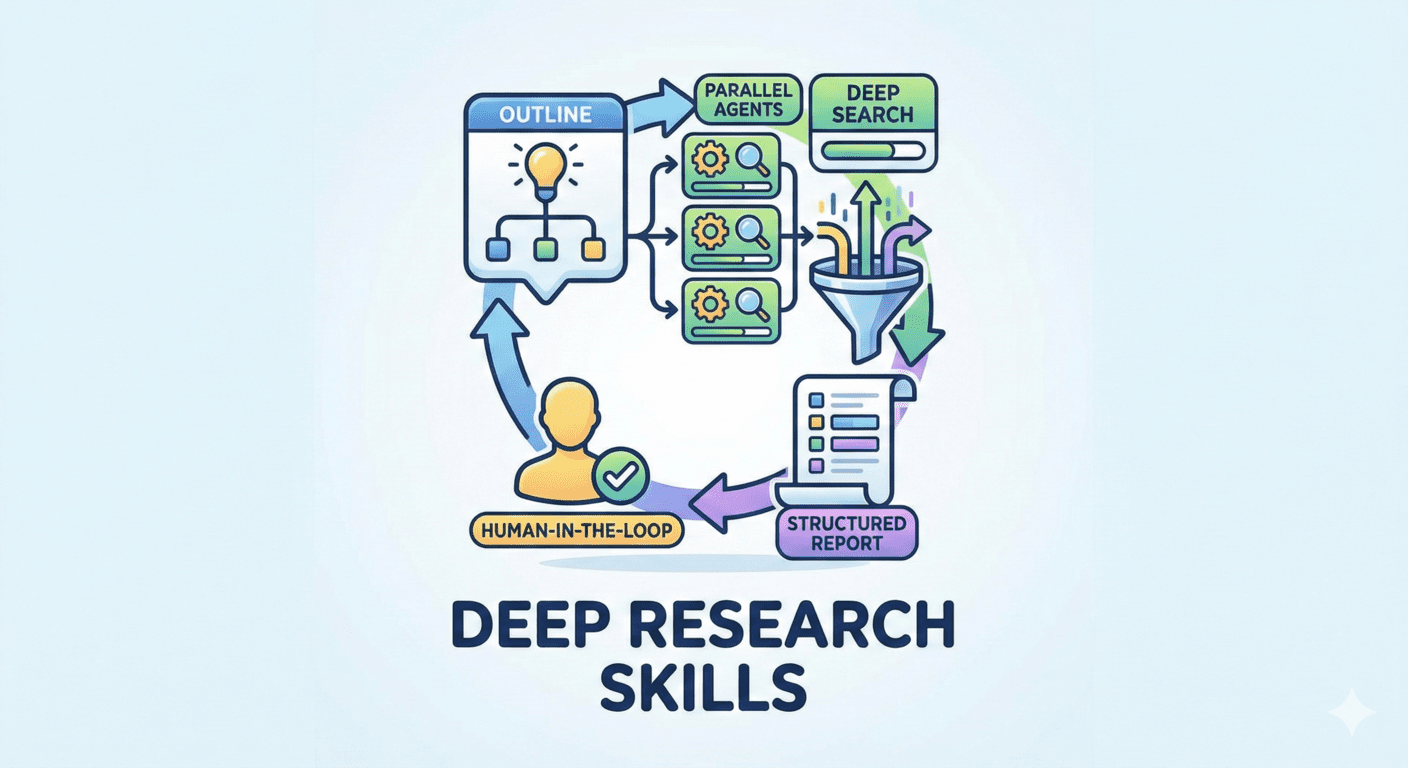
Claude Code, OpenCode, Codex용 구조화된 리서치 워크플로 스킬이에요. 개요 만들기(확장 가능)와 심층 조사의 두 단계 리서치를 지원해요. 사람이 중간에 확인하는(human-in-the-loop) 설계라 단계마다 정확하게 조절할 수 있어요.
쓰임새
- 학술 연구: 논문 서베이, 벤치마크 검토, 문헌 분석
- 기술 조사: 기술 비교, 프레임워크 평가, 도구 선택
- 시장 조사: 경쟁사 분석, 업계 동향, 제품 비교
- 실사(듀 딜리전스): 기업 조사, 투자 분석, 위험 평가
설치
git clone https://github.com/Weizhena/deep-research-skills.git
cd deep-research-skills
Claude Code
# 영어판
cp -r skills/research-en/* ~/.claude/skills/

# 중국어판
cp -r skills/research-zh/* ~/.claude/skills/

# 필수: 에이전트와 모듈 설치
cp agents/web-search-agent.md ~/.claude/agents/
cp -r agents/web-search-modules ~/.claude/agents/

# 필수: Python 의존성 설치
pip install pyyaml
OpenCode (기본: gpt-5.4)
# 스킬 (Claude Code와 같음)
cp -r skills/research-en/* ~/.claude/skills/   # 중국어판은 research-zh

# 필수: 현재 셸에서 웹 검색 켜기
export OPENCODE_ENABLE_EXA=1

# 선택: 계속 유지되게 하기
echo 'export OPENCODE_ENABLE_EXA=1' >> ~/.bashrc
source ~/.bashrc

# 필수: 에이전트와 모듈 설치
cp agents/web-search-opencode.md ~/.config/opencode/agents/web-search.md
cp -r agents/web-search-modules ~/.config/opencode/agents/

# 필수: Python 의존성 설치
pip install pyyaml중요: OpenCode에서는 어떤 모델이든 웹 검색을 하려면
OPENCODE_ENABLE_EXA=1이 필요해요. 그냥export만 하면 현재 셸에만 적용되고,~/.bashrc에 적어 두면 계속 유지돼요. 이 설정이 없으면web fetch만 쓸 수 있어 심층 조사 단계가 약해져요.
Codex
# 영어판
mkdir -p ~/.codex/skills ~/.codex/agents
cp -r skills/research-codex-en/* ~/.codex/skills/

# 중국어판
mkdir -p ~/.codex/skills ~/.codex/agents
cp -r skills/research-codex-zh/* ~/.codex/skills/

# 필수: 웹 조사 에이전트와 모듈 설치
cp agents-codex/web-researcher.toml ~/.codex/agents/
cp -r agents-codex/web-search-modules ~/.codex/agents/

# 필수: Python 의존성 설치
pip install pyyaml
아래 두 방법 중 하나로 ~/.codex/config.toml을 추가하거나 고치세요.
방법 A: 자동 스크립트
cd deep-research-skills
bash scripts/install-codex.sh
방법 B: 직접 고치기
suppress_unstable_features_warning = true

[features]
multi_agent = true
default_mode_request_user_input = true

[agents.web_researcher]
description = "Use this agent when you need to research information on the internet, particularly for debugging issues, finding solutions to technical problems, or gathering comprehensive information from multiple sources. This agent excels at finding relevant discussions. Use when you need creative search strategies, thorough investigation, or compilation of findings from multiple sources."
config_file = "agents/web-researcher.toml"
명령
Claude Code 2.1.0 이상: 이제
/skill-name으로 바로 부를 수 있어요!이전 버전:
run /skill-name형식을 쓰세요.Codex:
/skills->List Skills에서 고르거나, 예를 들어Use the research skill to build an outline for AI Agent Demo 2025처럼 자연스럽게 요청하면 돼요.
| 명령 (2.1.0 이상) | 설명 |
|---|---|
/research | 조사 항목과 필드를 담은 리서치 개요 만들기 |
/research-add-items | 기존 개요에 조사 항목 더하기 |
/research-add-fields | 기존 개요에 필드 정의 더하기 |
/research-deep | 병렬 에이전트로 항목마다 심층 조사 |
/research-report | JSON 결과로 마크다운 보고서 만들기 |
워크플로와 예시
예시: "AI Agent Demo 2025" 조사하기
1단계: 개요 만들기
/research AI Agent Demo 2025
💡 무슨 일이 일어나나요: 주제를 알려 주면 → 조사 목록을 만들어 줘요
받는 것: 조사할 AI 에이전트 17개 목록(ChatGPT Agent, Claude Computer Use, Cursor 등) + 각각 모을 정보
(선택) 부족하다면? 더 추가하기
/research-add-items
/research-add-fields
💡 무슨 일이 일어나나요: 조사 항목이나 필드 정의를 더해요
2단계: 심층 조사
/research-deep
💡 무슨 일이 일어나나요: AI가 항목마다 하나씩 웹을 자동으로 검색해요
받는 것: 에이전트마다 자세한 정보(회사, 출시일, 가격, 기술 사양, 평가...)
3단계: 보고서 만들기
/research-report
💡 무슨 일이 일어나나요: 모든 데이터 → 정리된 보고서 하나
받는 것: report.md — 목차가 있는 완성된 마크다운 보고서. 바로 읽거나 공유할 수 있어요
도움이 필요하면
궁금한 점이 있으면 Claude Code, OpenCode, Codex에게 이 프로젝트를 설명해 달라고 하세요.
Help me understand this project: https://github.com/Weizhena/deep-research-skills
참고 자료
- RhinoInsight: Improving Deep Research through Control Mechanisms for Model Behavior and Context
라이선스
MIT
평점
- 5점
- 0
- 4점
- 0
- 3점
- 0
- 2점
- 0
- 1점
- 0